How to keep a web design project on budget.
Most web design projects don't blow the budget in one go. They drift past it fifteen minutes at a time, and you find out when the work is done and the money is gone. Here's how to see it coming, and what to do about it while it still matters.
Where the Hours Go
Ask a designer why a project ran over and the answer is usually "the client". Look at the hours and it's rarely that simple. Overruns on Squarespace projects tend to come from five places, and only two of them are the client's:
- The estimate was low to begin with. You quoted the build and forgot the kickoff call, the content wrangling, the mobile pass, the hand-off and the week of "one more thing" after launch.
- Content arrived late or in pieces, so pages were built twice: once with placeholders and once with the real text and images.
- Revision rounds didn't end. Three rounds became six because nobody said which round they were on.
- Small requests went unbilled. The quick text change and the image swap never felt worth a timer, and together they added up to a day.
- Nobody was counting. Time was estimated at the start and totalled at the end, with nothing in between to compare against.
The last one is the root of the others. If you know on day eight that you've used 60% of the hours and the design isn't approved yet, you can do something. If you learn it on day thirty, all you can do is absorb it.
Estimate From Hours, Even When You Charge a Flat Fee
A flat fee is still a number of hours with a price on it. If you don't know how many hours, you don't know whether the fee is good. Before you quote, break the project into the stages you'll actually go through and put an hours figure beside each one:
- Discovery and kickoff: the call, the questionnaire, the sitemap.
- Content collection and preparation: chasing, editing, resizing.
- Design and build, by page or by section.
- Revision rounds, with the number of rounds and the hours you allow for each.
- Testing, mobile pass, SEO basics, forms and integrations.
- Hand-off: training, documentation, transferring ownership.
- Post-launch support, if any is included, and for how long.
Then add a contingency. Fifteen to twenty-five percent is normal for a project with a client you haven't worked with before. It isn't padding; it's the honest cost of the things you can't name yet. Multiply the total by your hourly rate and you have a floor for the fee. If the number the market will pay is lower than that, you've learned something important before you started rather than after.
Keep the hours figure to yourself. The client sees a price and a scope. The hours are your budget, and you'll measure the project against them.
If you've never tracked your time, estimate the next project anyway, then track it. The gap between the two numbers is the most useful thing you'll learn this year, and the first estimate is usually off by more than half.
Hourly, Flat Rate or Both
Flat fees suit work you can define: a five-page site from a template, a known set of integrations, two revision rounds. The client knows the cost, you're rewarded for working efficiently, and the risk of a bad estimate is yours.
Hourly suits work you can't define: "make the homepage feel more modern", debugging someone else's custom code, a content migration where nobody knows how many pages there are. The client carries the risk, and in return you have to show them where the hours went.
Most Squarespace designers end up with a hybrid, and it's the arrangement that protects the budget best: a flat fee for the agreed scope, and anything outside it priced per task, either fixed or hourly. The flat fee stops you from re-quoting every small change, and per-task pricing stops the small changes from eating the fee. How to prevent scope creep covers how to write that scope so the line is clear.
Track Time Against Tasks, Not Against the Project
A single project timer tells you that you've spent 22 hours. It doesn't tell you that nine of them went on the client's photo gallery, which was a two-hour job in the estimate. Track time against the piece of work it belongs to, and the overrun has a name.
That means every request has to become a task before you start on it. Requests that arrive by text, email and voice note at 9pm don't get timed, and untimed work is the work that quietly takes the project over budget. Give clients one place to ask, turn each ask into a task, and run the timer from the task. How to manage revisions with clients is the process side of that.
Time the small things. Fifteen minutes doesn't seem worth a timer, which is exactly why fifteen-minute jobs are where budgets go. If starting the timer takes more than a click, you won't do it, so pick a tool where the timer lives on the task rather than in a separate app.
Check the Budget at Every Checkpoint
You already have natural checkpoints: sitemap approved, design approved, content in, build complete, revision round closed. At each one, put the hours used beside the hours planned for that stage. It takes two minutes and it's the whole point of tracking.
Three signals tell you a project is heading over before the hours say so:
- Content is late. Every week of waiting for copy is a week of rebuilding pages later.
- The revision count is climbing without a round being closed. Two rounds that never end are six rounds.
- Requests are arriving that aren't in the scope and haven't been priced. Each one is unbudgeted time.
Say something at 60 to 70 percent of the hours, not at 100. "We've used most of the design time and I want to make sure we land the homepage before we move on" is an easy conversation. "We're over budget" is not.
What to Do When You Are Over
First work out whose overrun it is, because the answer decides what you do next.
Your estimate was wrong
If the scope hasn't changed and you simply took longer, the hours are yours to absorb. Don't bill them. Do write down why, because this is the number that fixes your next quote.
The client added or changed something
New pages, a fourth revision round, a feature that wasn't in the scope: these are change requests, and they're billed. Say so when they arrive, not at the end. "That's outside the original scope, so it would be $180 and about a day. Shall I go ahead?" The question is easy to ask on the day the request is made and nearly impossible to ask after the work is done.
The project became a different project
When the extras add up to something bigger than the original brief, stop and re-scope. Write up what's been delivered against the first scope, and propose the rest as a second phase with its own price. A clean phase two is better for both of you than a phase one that never ends.
Whichever it is, the conversation goes better when you can show the hours by task. "The gallery took nine hours because the images came in four batches" is a fact. "It took longer than I thought" is an apology.
Rework the Quote Before the Next Project, Not During This One
Resist the urge to re-quote a live project to make the numbers fit. The budget was the plan; the hours are what happened. Let them disagree, finish the work, and then sit down with both.
After each project, compare the estimate to the actual hours stage by stage. You're building a table of your own: how long a five-page Squarespace build really takes you, how many hours a revision round actually costs, how much content chasing a typical client needs. After three or four projects that table will quote more accurately than your instinct ever did, and you'll be able to raise your flat fees with a straight face because you'll know what they cover.
If a client keeps generating small requests after launch, that's not a budget problem to solve on the next quote. It's a care plan waiting to be sold.
Where Squarepaste Fits
Squarepaste doesn't write estimates, and the hours you planned for a build stay in your proposal. What it holds is the budget for the work after launch: set a monthly budget on the project in Billing, in dollars, and a bar above the task list shows how much of the month is used, on your dashboard, in the widget on the client's site and in their portal. It makes the actual hours exist too, per task, without a second app.
On a Squarespace site, every request from the client, pinned to the page in the editor, sent in chat or raised in the portal, becomes a task. You mark each one No cost, Fixed cost or Hourly, and an hourly task has its own timer in the dashboard and in the widget. Only one timer runs at a time, so two tasks are never billed for the same hour, and the Time page lists every entry across every project with the task it belongs to. Set an hourly rate on your account, or a different one on a project, and one click turns the time logged on a task into its cost, which the client sees and pays from the task through your own Stripe account. Clients never see a running timer, only the hours and the cost once they're on the task.
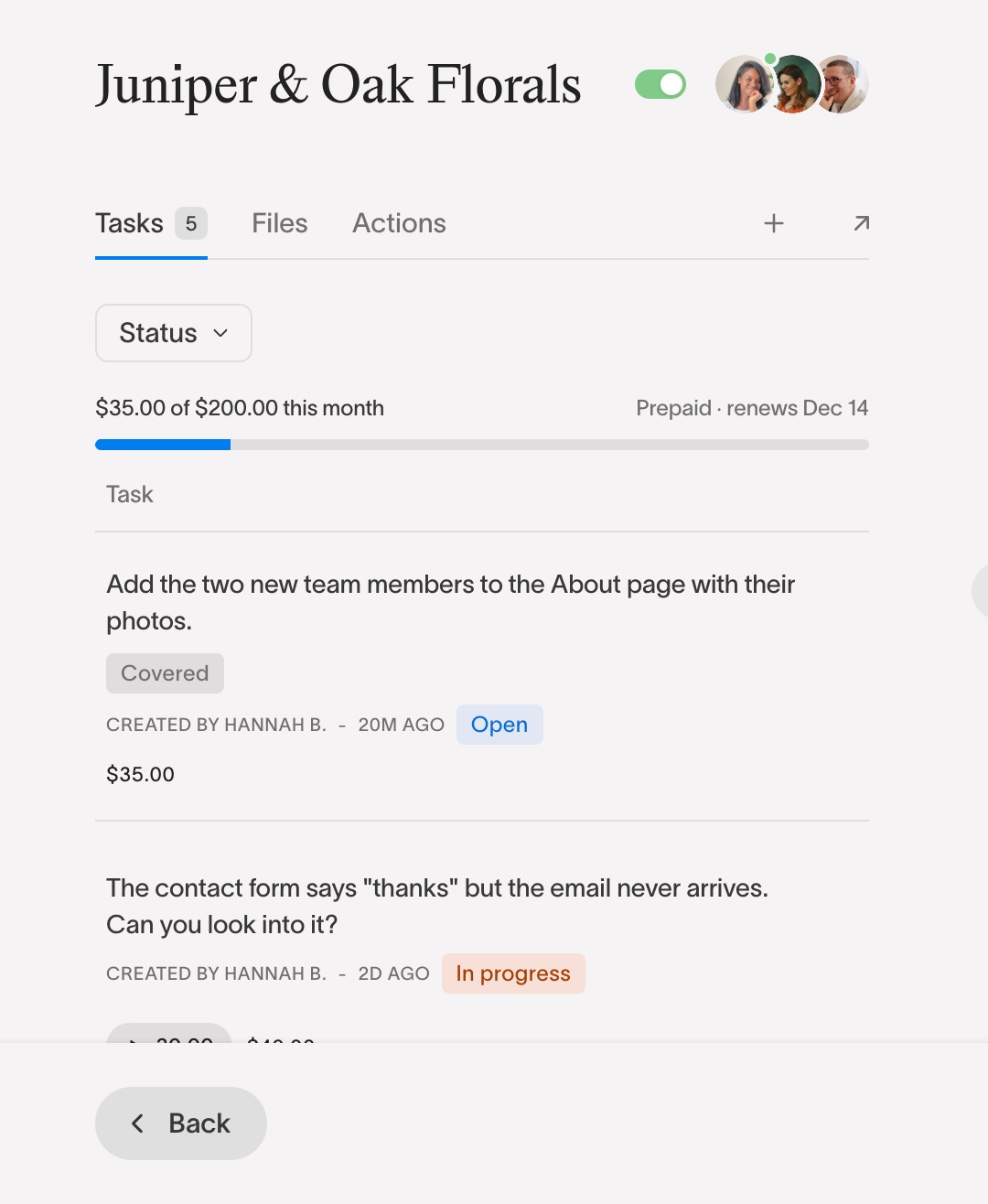
A request that arrives after the month's budget is spent is labelled over budget, and the task gives you the two answers from this guide: price it and request payment, or hold it to the day the budget renews. Clients who would rather pay the budget up front can start it as a monthly plan through your Stripe account, and tasks that fit in the month then show as covered. For the step-by-step version, from a running timer to a paid task, see time tracking for web designers, or see pricing.
Common Questions
Why do web design projects go over budget?
Usually a low estimate, late content, revision rounds that never close, small requests that go unbilled, and no time tracking to show the overrun while there's still time to act.
Should I charge hourly or a flat fee for a Squarespace website?
A flat fee for a scope you can define, hourly for open-ended work, and most often both: a flat fee for the agreed site with changes outside it priced per task.
How much contingency should I add to a web design quote?
Fifteen to twenty-five percent on top of your hours estimate is normal, more for a new client or an unfamiliar integration.
What do I do when a project has already gone over budget?
Work out whose overrun it is. Absorb your own estimating mistakes, bill client-added work as change requests, and re-scope into a second phase if the project has outgrown the brief.
Related Reading




Chat directly
on Squarespace.
Squarepaste helps you stay connected with the clients you manage. Chat directly and make every conversation count.