The private chat widget for your clients’ Squarespace sites
Bridge lets you and your clients talk — and leave pinned page feedback — right where they work, inside the Squarespace editor. It runs on your own free Supabase, so you own every conversation and never pay a monthly fee.
One-time price · Unlimited client sites · No monthly fees

Everything your client conversations need, in one widget
Real-time, two-way chat
You and your client message each other right on the site. Replies appear live both ways — no refresh, no email tag, no third-party inbox in the middle.
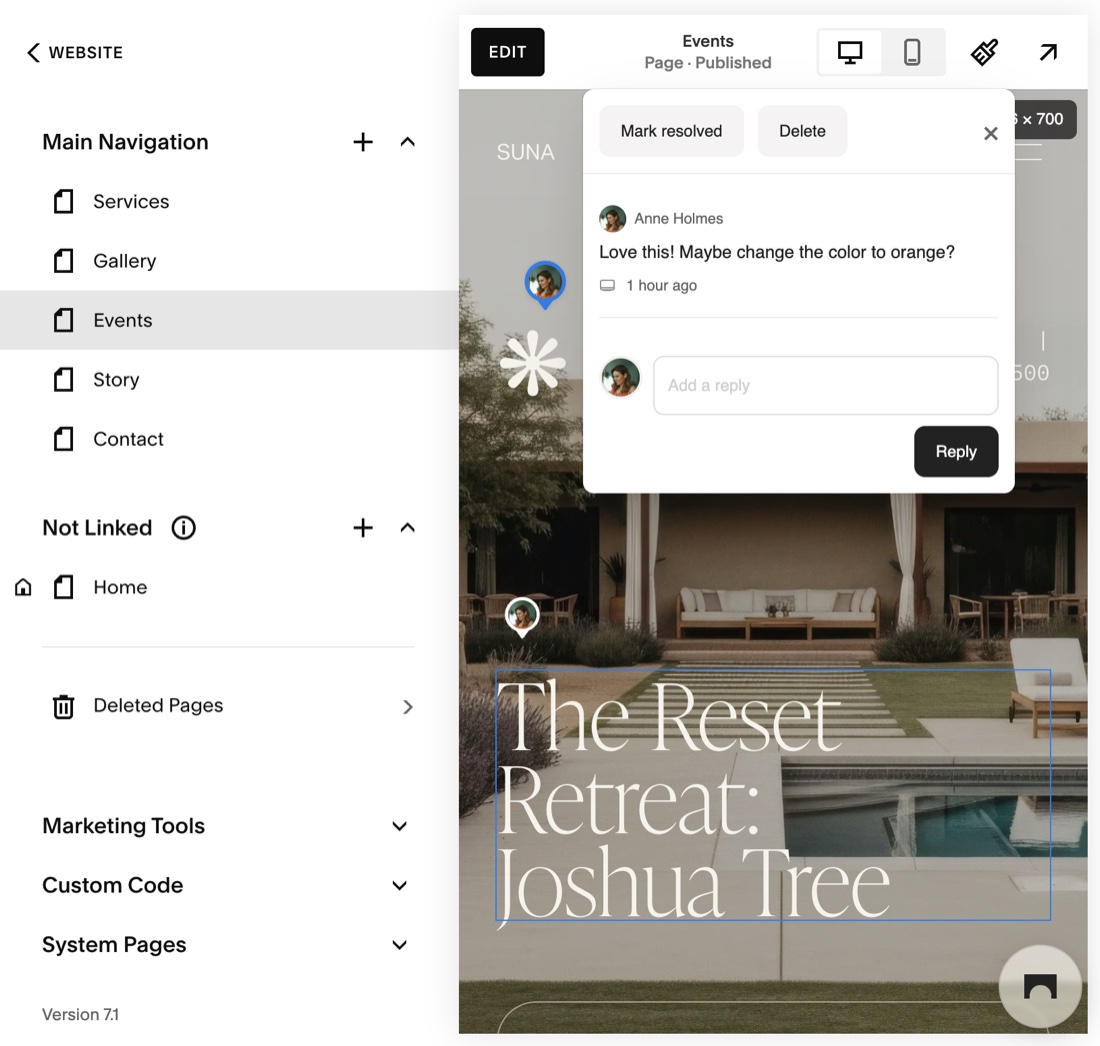
Tasks — pinned page feedback
Drop a marker on any element and leave a comment, just like Webflow Comments or Markup.io. Threaded replies, resolve/reopen, and per-page filters keep revisions organized.
File & image sharing
Send mockups, PDFs, and screenshots inside the conversation. Attachments live in your own storage and stay attached to the project they belong to.
You own the data
Bridge runs on your own free Supabase project. The conversations, files, and feedback are yours — not rented from a SaaS that can raise prices or shut down.
Private by design
The chat bubble only renders while a site is open in Squarespace edit mode, so the public never sees it. Add an optional passcode for a second layer.
Unlimited client sites
One embed snippet works across every site you build. Each registers under its own ID automatically — no per-site setup, no per-seat billing.
Live on every client site in minutes
No server to run and nothing to maintain. A one-time setup on your own Supabase, then a single snippet you reuse forever.
- 01
Create a free Supabase project
Spin up a project on Supabase’s free tier — it’s where your chats, files, and feedback live. Takes a couple of minutes.
- 02
Run the one-time setup
Paste the included SQL into the Supabase editor and upload widget.js to your storage bucket. The script is idempotent and safe to re-run.
- 03
Paste one snippet per client
Drop the embed snippet into Squarespace → Code Injection → Footer. Open the site in edit mode and start chatting. That’s it.
Buy it once. Own it outright.
No subscriptions, no per-seat fees, no vendor lock-in. Bridge runs on your own free Supabase project, so the only thing you ever pay is the one-time price — for unlimited client sites.
Frequently asked
- How is Bridge different from a normal chat plugin?
- Bridge is self-hosted on your own free Supabase project, so there are no monthly fees and you own every conversation. It’s built for the designer↔client relationship: it only appears in Squarespace edit mode, and it includes pinned page feedback (Tasks) alongside chat.
- Do my clients need an account or login?
- No. There’s no login and no admin dashboard. The privacy gate is Squarespace edit mode — the widget only renders while the site is open in the editor, so it stays private to you and your client. You can add an optional passcode for a second layer.
- Is it really a one-time price?
- Yes — $249 once, for unlimited client sites, forever. Because it runs on your own free Supabase, there are no recurring fees to Squarepaste or anyone else.
- What are Tasks?
- Tasks is pinned page feedback, like Webflow Comments or Markup.io. In edit mode you click any element on the page to drop a marker and leave a comment, with threaded replies, resolve/reopen, and Open/Resolved filters. Markers reappear on the page they were created on and sync live both ways.
- Where do the messages and files live?
- In your own Supabase project — the database for messages and feedback, and storage buckets for the widget and file attachments. Nothing depends on a third party, and you can export or delete it whenever you want.