Squarespace pricing plans, compared.
Squarespace has four plans, and the gap that matters most is between Basic and Core. Here's what each plan includes, what it leaves out, and how to choose without paying for features you won't use.
The Four Plans at a Glance
US prices on squarespace.com/pricing as of October 2026:
- Basic: $19 a month billed annually, $25 month to month. Two contributors, 30 minutes of video, 2% fee on store sales.
- Core: $29 a month billed annually, $39 month to month. Unlimited contributors, custom code, 5 hours of video, no fee on store sales.
- Plus: $49 a month billed annually, $65 month to month. Lower card and digital product fees, reserved carts and countdown timers, 50 hours of video.
- Advanced: $99 a month billed annually, $139 month to month. No fees on digital products or memberships, the lowest card rates, unlimited video.
Every plan includes hosting, SSL, unlimited bandwidth, SEO tools, 24/7 support, a free domain for the first year on annual billing, and a 14-day free trial. For the full yearly cost, including domains, email and design, see how much a Squarespace website costs.
Basic: What You Get and What You Don’t
Basic is a capable plan for a simple site. It includes the CSS editor, the basic code block, embed blocks, Squarespace Extensions, basic website metrics, and more commerce than you might expect: unlimited products, checkout on your own domain, customer accounts, abandoned cart recovery, subscriptions, gift cards and point of sale.
What Basic leaves out is where most sites outgrow it:
- Code Injection and JavaScript in code blocks. No analytics tags, chat widgets, booking embeds that need scripts, or most third-party tools.
- Only two contributors, and the site owner counts as one. An owner plus one designer fills it.
- Announcement bar, promotional pop-ups and the mobile information bar.
- Ecommerce analytics, discounts, Mailchimp and Zapier integrations, Google Shopping, shipping labels, carrier-calculated shipping and automated tax.
- A 2% transaction fee on store sales and 7% on digital products and memberships.
If someone else builds or looks after the site, the two-contributor limit is the one that bites. Inviting a second designer, a copywriter or a business partner means upgrading to Core. See how to give a client access to Squarespace.
Core: The Plan Most Business Sites Need
Core costs $10 a month more than Basic on annual billing and removes nearly every limit above. You get Code Injection and full code blocks, unlimited contributors, the announcement bar and pop-ups, ecommerce and purchase funnel analytics, discounts, Commerce APIs, and no transaction fee on store sales.
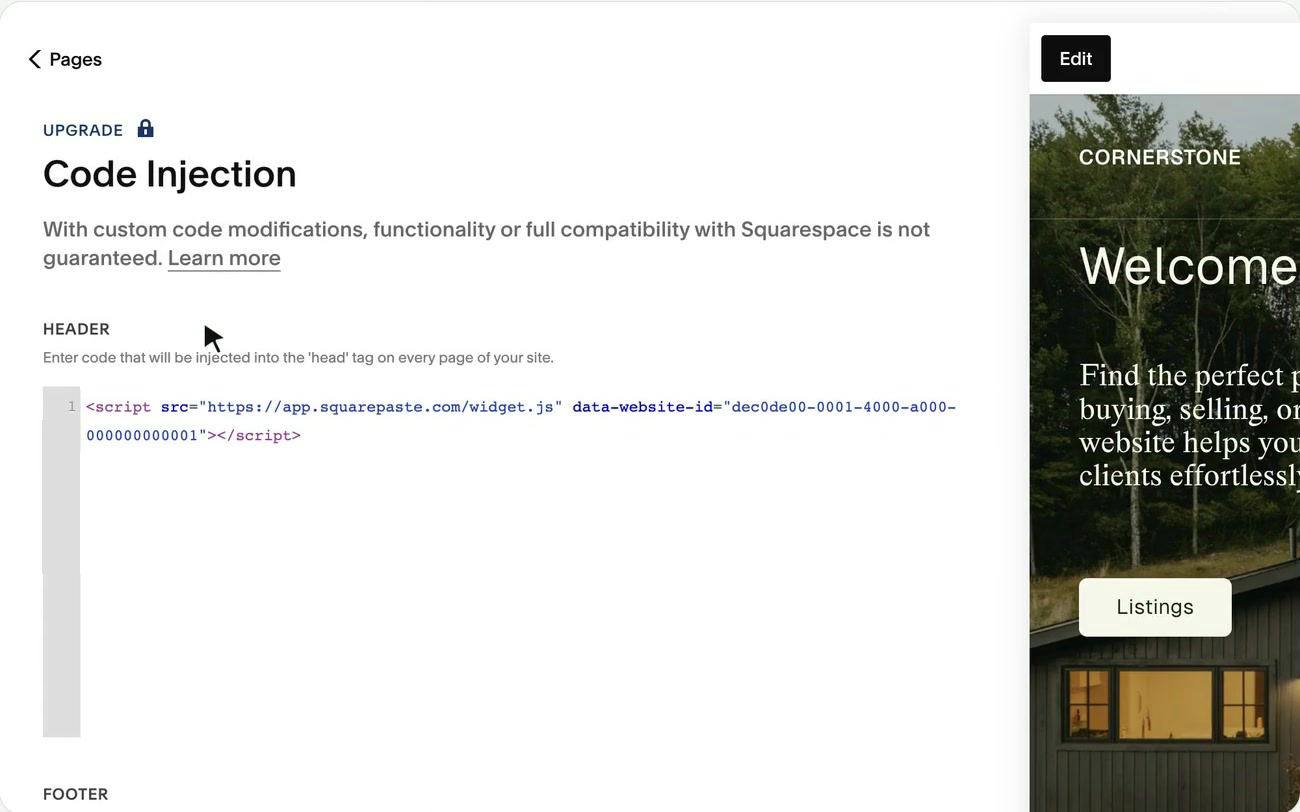
Code Injection is the feature people most often discover they need after launch. It's where analytics, tracking pixels, chat widgets and other tools are pasted, in the Header box that loads on every page:
If you sell more than about $500 a month in physical products, Core also pays for itself on fees alone: the 2% Basic fee on $500 is $10, the price difference between the plans.
Plus and Advanced: For Stores Selling at Volume
Plus and Advanced don't add much for a site that isn't selling. What they change is the cost of selling:
- Card processing: 2.9% + $0.30 on Basic and Core, 2.7% + $0.30 on Plus, 2.5% + $0.30 on Advanced.
- Digital products and memberships: 5% fee on Core, 1% on Plus, none on Advanced.
- Automated tax: 0.15% per order on Core, 0.10% on Plus, 0.05% on Advanced.
- Reserved cart and countdown timers, on Plus and Advanced only.
- Video hosting: 50 hours on Plus, unlimited on Advanced.
Work it out from your own sales. A store taking $10,000 a month by card saves $20 a month in processing on Plus compared with Core, which covers the $20 price difference. A site selling courses or memberships saves far more, because the digital product fee drops from 5% to 1%.
Which Plan Should You Choose?
- Basic: a portfolio, a personal site or a simple brochure site that one person manages and that doesn't need any third-party tools.
- Core: most business websites. Choose it if more than two people will work on the site, you need analytics or other scripts, or you sell physical products.
- Plus: stores with steady card sales, or sites selling courses, memberships or digital products.
- Advanced: high-volume stores and membership sites where the lower fees outweigh the higher plan price.
When in doubt, start on Core with annual billing. It's the plan least likely to block something you need, and you can move up later.
Changing Plans Later
- Upgrading is prorated, and the new features unlock right away.
- Downgrading keeps your current features until the end of the period you've paid for. Squarespace doesn't refund downgrades.
- Moving down to Basic first means getting to two contributors or fewer and removing features Basic doesn't support, such as carrier-calculated shipping and automatic tax.
- Switching from monthly to annual billing takes effect immediately and resets your renewal date.
Sites on legacy plans (Personal, Business and the Commerce plans) can keep them while the subscription stays active. Changing plan, or letting the site expire, moves it to the current plans, and you can't go back.
For Designers: Why Your Clients Need Core
If you build Squarespace sites for clients, the Basic plan's two-contributor limit and missing Code Injection are the two things most likely to cause trouble after handoff. Recommend Core in your proposal, and explain why: room for you and the client on the site, and space for the tools the business will add.
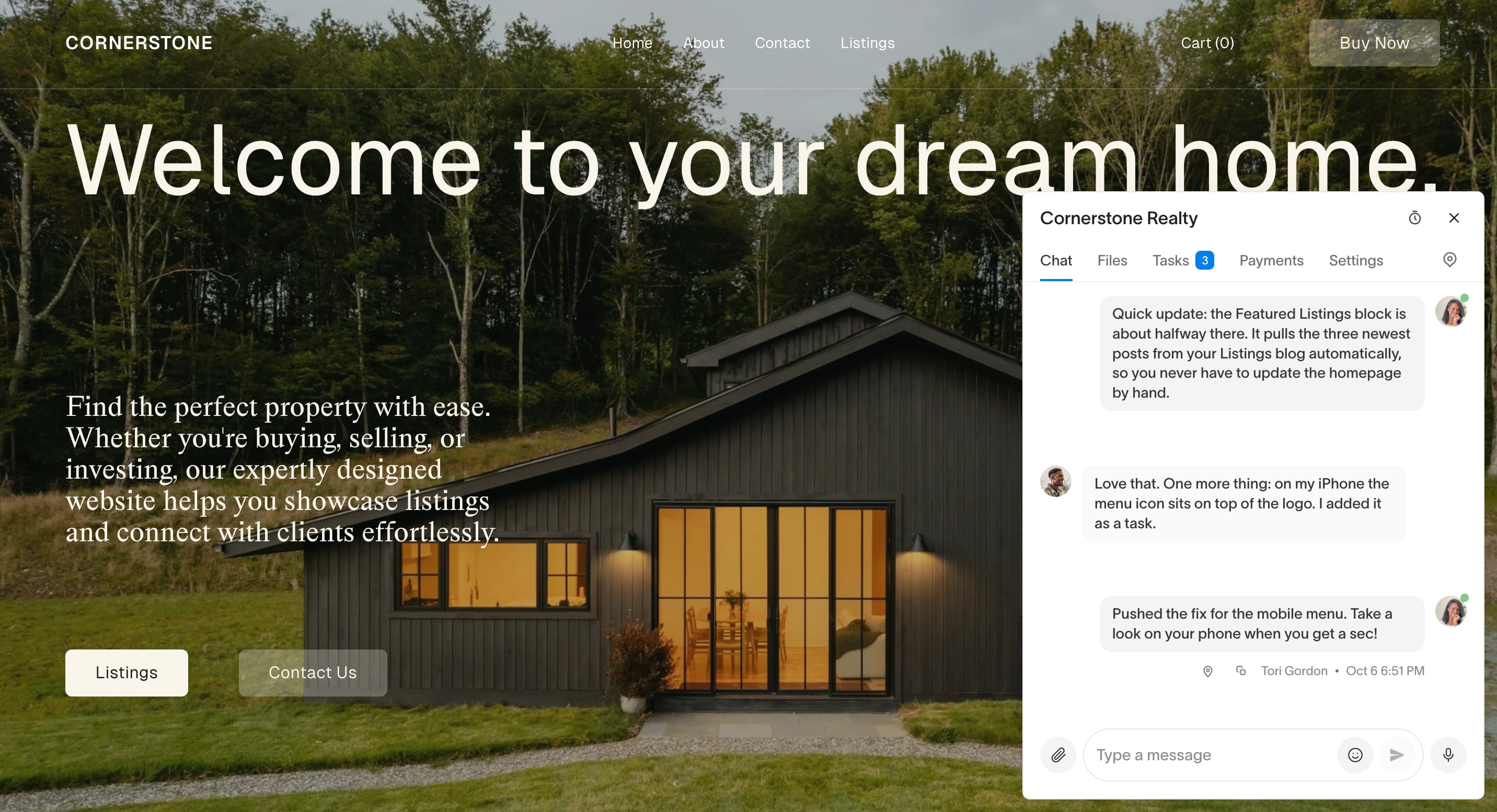
Squarepaste installs through Code Injection too, so it needs Core or higher. Once it's in, your client gets a chat button inside their own Squarespace editor to ask for changes, pinned to the spot on the page. Each request becomes a task you can price, and the client pays it straight into your Stripe account.
Squarepaste plans start at $19 a month for five client sites. See plans and pricing, or how to install it. Every plan starts with a 14-day free trial, no card needed.
Common Questions
What is the difference between Squarespace Basic and Core?
Core adds Code Injection and JavaScript, unlimited contributors (Basic allows two), the announcement bar and pop-ups, ecommerce analytics, discounts and integrations, and removes the 2% fee on store sales. It costs $10 a month more on annual billing.
Which Squarespace plan is best for a small business?
Core, for most. It covers custom code, analytics, more than two contributors and fee-free store sales. Basic suits a simple site one person manages.
Does the Squarespace Basic plan have Code Injection?
No. Code Injection and JavaScript in code blocks need Core, Plus or Advanced. Basic does include the CSS editor and a basic code block.
How many contributors can a Squarespace site have?
Two on Basic, including the site owner. Core, Plus and Advanced allow unlimited contributors.
Can I change my Squarespace plan later?
Yes. Upgrades are prorated and take effect right away. Downgrades take effect at the end of the paid period, with no refund for the difference.
Related Reading




Chat directly
on Squarespace.
Squarepaste helps you stay connected with the clients you manage. Chat directly and make every conversation count.