Squarespace law firm websites that turn searches into booked consultations.
Plenty of law firms run their entire web presence on Squarespace, from solo practices to multi-attorney firms. It handles what a legal site actually needs: practice-area pages, attorney bios, intake forms, and a fast mobile layout, all without a developer on retainer.

Featured by reviewers, designers, and plugin experts in the Squarespace community






What a Squarespace law firm website costs
A template is a one-time cost on top of your Squarespace plan, and you edit everything yourself in the Squarespace editor.
| Path | Typical cost | What it includes |
|---|---|---|
| DIY with a template | $129 template + Squarespace plan | A one-time template purchase on top of your Squarespace subscription. Our Esquire template is $129; other law firm templates commonly run $229 to $299. Add your content yourself, or have us set it up for you. |
Your Squarespace subscription is billed separately by Squarespace.
Start with a law firm template
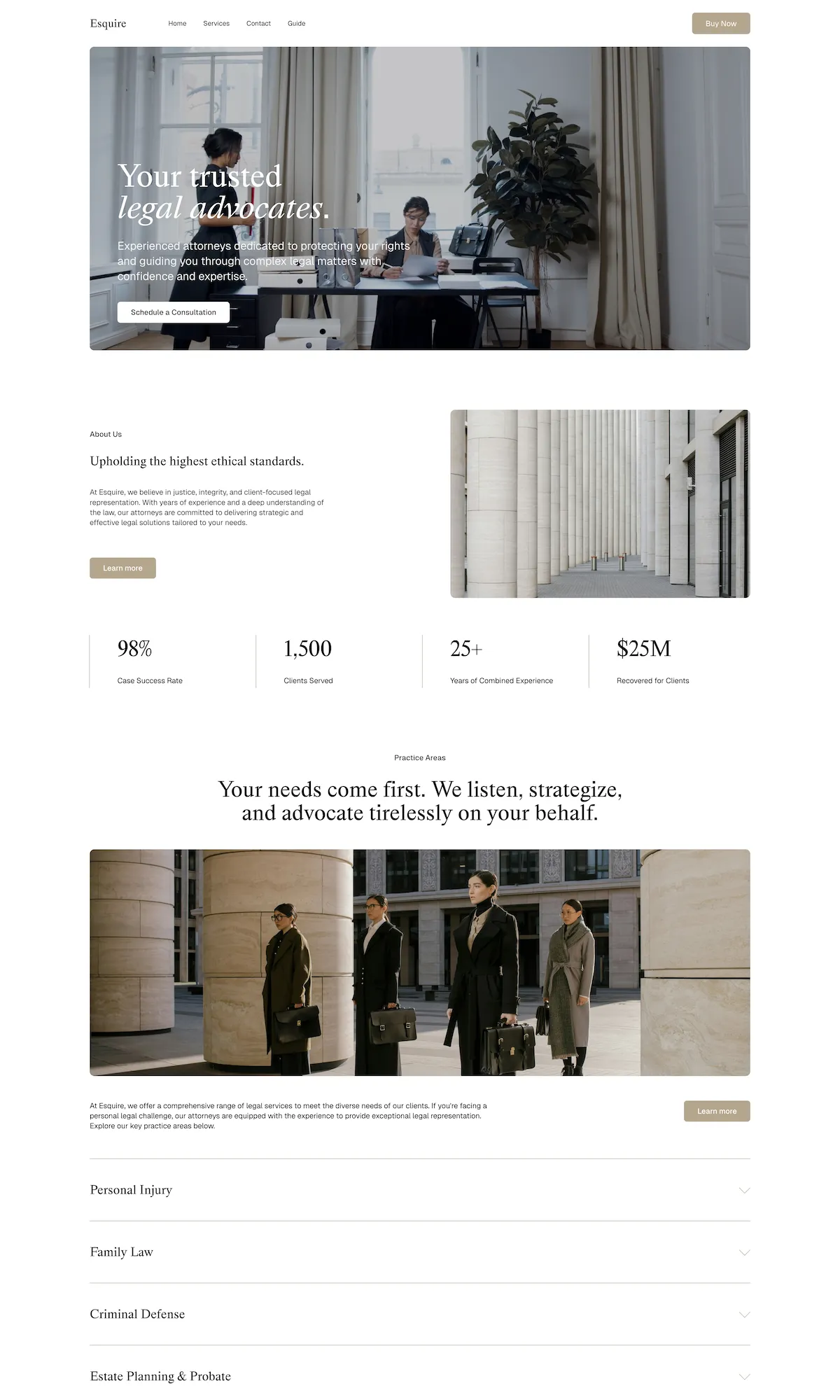
Esquire template
$129 one-time
A law firm template built on Squarespace 7.1, with practice-area pages, attorney bios, and intake, ready to edit. Best if you want a fast, affordable start.
Preview the Esquire template
The live Esquire demo. Explore it below, or open it in a new tab.
What a law firm website actually needs
A legal website earns its keep by turning a stressed searcher into a booked consultation. Each of these does part of that job.
Practice-area pages
Clients search by their problem, like "DUI lawyer" or "estate planning attorney," not by your firm name. A dedicated page per practice area matches how people search and gives Google a distinct page to rank for each service you offer.
Attorney bios
Hiring a lawyer is a trust decision. Real photos, credentials, bar admissions, and a plain-language background do more to move a hesitant visitor than any tagline. Firms with more than one attorney need a bio for each.
Case results, handled carefully
Outcomes and representative matters are evidence of competence. They also fall under attorney-advertising rules that vary by state, so results usually need a disclaimer and cannot promise similar outcomes. Build the section; have your own bar rules guide the wording.
Consultation booking and intake
The moment a visitor decides to reach out is the moment you convert a search into a client. A short intake form or a scheduling link on every practice-area page captures that intent before it cools.
Clear contact details and a visible phone number
A large share of legal inquiries still come by phone, often from someone under stress. Keep the number in the header, make it click-to-call on mobile, and never bury contact behind a single form.
Local SEO signals
Legal work is local. Your city and service area, a consistent name, address, and phone, and a page for each office location help you show up in the local pack where most firms actually compete.
Mobile performance
Most first visits are on a phone, and legal searches are often urgent. A fast, well-structured mobile layout affects both whether the visitor waits around and whether Google ranks you.
Accessibility
Readable contrast, real headings, and labeled forms widen your reach and reduce legal exposure under the ADA, a standard a law firm of all businesses is expected to meet.
Frequently asked questions
Yes. Squarespace handles what a legal site needs: practice-area pages, attorney bios, intake forms, fast mobile performance, and clean local SEO, all without a developer on retainer. It is a strong fit for solo practices and small-to-mid firms that want a professional site they can maintain themselves. Very large firms with complex integrations sometimes outgrow it, but most do not.
Yes. Squarespace forms capture the basic intake details (name, matter type, and message) and route them to your inbox or a connected tool. You can embed a scheduling link for consultations and connect email marketing. For conflict checks or full case management you would still use dedicated legal software, with the website feeding the first contact into it.
It can. Squarespace outputs clean, fast, mobile-friendly pages and lets you set titles, meta descriptions, and clean URLs, the technical basics Google rewards. Ranking then comes down to the usual work: a page for each practice area, genuinely useful content, consistent local citations, and a Google Business Profile. The platform does not hold you back; the content and local signals do the ranking.
No. A law firm template is built with native Squarespace blocks, so you edit copy, swap images, and adjust colors in the editor with no code. You would only bring in a developer or designer if you want a heavily customized layout or a bespoke build.
They solve different problems. Clio is practice-management software for matters, billing, and case management, not primarily a website builder. LawLytics is a website-and-marketing service built specifically for law firms, with legal content support, usually at a higher recurring cost. Squarespace gives you a professional, self-managed website you own outright, and it pairs well with separate practice-management software like Clio for the case-handling side.
With a template, you can have a site live in a few days once your content is ready. The template arrives in your Squarespace dashboard and you fill in your firm details.
A template is a one-time purchase on top of your Squarespace subscription: Esquire is $129, and other law firm templates commonly run $229 to $299.
For a marketing website, yes. Squarespace provides SSL, managed hosting, and platform-level security, so the public site is well protected. Confidential client data and privileged documents should live in dedicated legal software behind proper access controls, not on the website. The site is the front door, not the file room.